
The brief
The homeowner contacted us following a suspected security incident involving compromised accounts and possible unauthorised access to their network. We weren't asked to investigate what had happened, but it had changed how they thought about the technology in their home.
The existing setup was an ISP-supplied router and a basic consumer mesh Wi-Fi system. Rather than improving it piece by piece, the homeowner asked us to replace it with infrastructure they could have greater confidence in.
That initial security project has since developed into a wider system covering networking, whole-property Wi-Fi, CCTV, automatic vehicle access, video intercoms, local storage and whole-home audio.
Starting again with the network
The first stage was rebuilding the core network. Existing cabling was traced and tested: where a cable was in good condition and suitable for reuse we kept it, and where it wasn't, it was replaced.
Space didn't allow for a conventional network rack, so the central equipment was installed neatly within a dedicated cupboard. At the heart of it sits a UniFi UDM-SE gateway alongside UniFi switching and a dedicated UNVR, distributing connectivity throughout the house, garden and separate garden gym.
Security beyond a Wi-Fi password
Because security was the reason for the project in the first place, we wanted to go further than simply installing a better wireless network. The network uses VLAN segmentation to separate categories of device rather than placing everything onto one flat home network, and management access is protected with multi-factor authentication.
Additional CybSecure protection sits on top of that.
- Intrusion detection and prevention
- DNS filtering
- Geographic filtering
- Additional network security controls
Nine access points across the property
The size and shape of the property meant a single router or small consumer mesh system wasn't an appropriate way to provide consistent coverage. Nine UniFi access points are installed across the house and grounds, including dedicated outdoor units.
Wi-Fi extends along the garden and into the garden gym, with seamless roaming configured throughout — as someone moves between the house, garden and gym their device moves between access points while staying on the same wireless network.
Ten cameras with local recording
The security installation includes ten UniFi Protect cameras around the property, with video retained locally on the UNVR and cloud event storage providing an additional layer for important events.
Detailed camera positions and coverage have intentionally been left out of this case study for the homeowner's privacy and security.
- Two PTZ cameras
- A dedicated licence plate recognition camera
- Person-tracking capabilities
- Local recording through a UniFi UNVR
A gate that recognises the car
One of the most useful integrations is at the property's existing automated entrance gate. Rather than replacing the gate equipment, we integrated the new UniFi system with the existing gate controller.
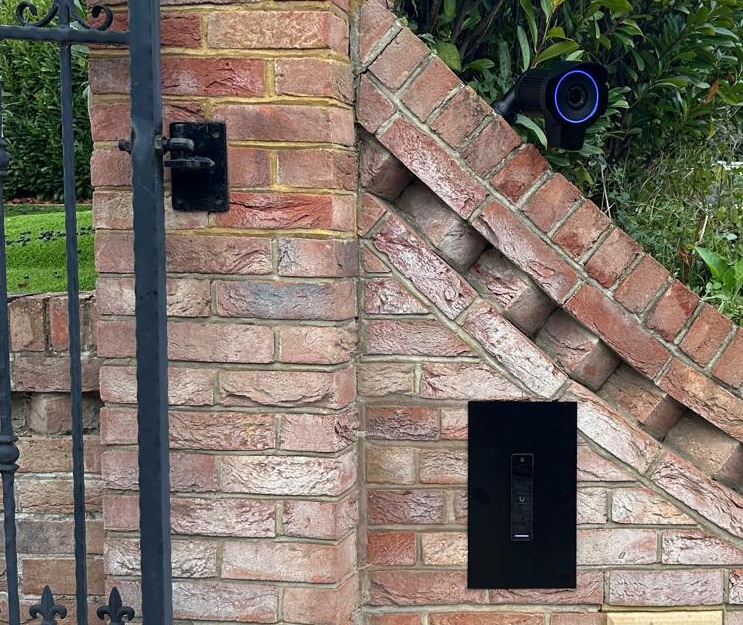
A dedicated LPR camera monitors vehicles approaching the entrance. When a vehicle reaches the appropriate area its registration is checked against the homeowner's authorised list, and a recognised vehicle opens the gate automatically — no remote control to find, and no need to stop and enter a code.
Privacy masking is configured so plate recognition focuses on vehicles actually approaching the property rather than reading passing traffic. Registrations can be managed remotely, so vehicles can be added or removed whenever required.
And when the car isn't recognised?
An unknown registration doesn't open the gate. Instead, visitors use a UniFi UA G3 Pro intercom at the entrance, with a second unit at the front door. Intercom Viewers in the kitchen and master bedroom let the homeowner see and speak to visitors and operate the relevant entrance, and the system can be answered remotely from a phone when they're away.
For the household's own access, the system supports facial recognition, mobile wallet credentials and NFC. The front-door unit is currently used for communication and identification rather than electronically unlocking the door.
One security ecosystem
Bringing the network, cameras and access system together within the UniFi ecosystem was an important part of this installation. Instead of an ISP router from one manufacturer, a consumer mesh system from another, a standalone CCTV app and a separate gate intercom, the core infrastructure is managed as a joined-up system.
It also means ongoing support doesn't require the homeowner to work out which individual product or supplier is responsible when something needs changing.
Fixing a Sky Q Wi-Fi conflict
Not every part of a modern home fits neatly into a managed network. During the project the property's Sky Q equipment was creating and using its own wireless connectivity, which conflicted with the new Wi-Fi environment.
Rather than accepting the extra wireless network and the interference it created, we installed wired-to-Wi-Fi converters so the Sky boxes communicate over the managed infrastructure instead. A small part of the overall installation, but an example of why whole-home networking usually involves more than adding access points.
Extending the system into entertainment
Once the network and security infrastructure was established, the homeowner asked us to return and expand the property's entertainment system. A seven-zone Sonos installation now provides audio around the home, with rooms playing individually or grouped together, and a Sonos Arc Ultra-based surround system in the main living room.
For the garden the homeowner uses a portable Sonos speaker rather than permanently installed outdoor speakers — the garden already has extensive Wi-Fi coverage, so it stays connected outside. The installation deliberately uses the standard Sonos ecosystem rather than adding unnecessary layers of automation.
Bringing their music collection back home
Alongside streaming services such as Apple Music, the homeowner has their own music collection. We installed a 4 TB UniFi UNAS 2 to provide local network storage for it, accessible across the network alongside their cloud-based services, with capacity left for other local file storage in future.
The objective wasn't to replace cloud services simply because local storage was available — both can coexist, and the homeowner uses whichever makes sense for the content concerned.
Gigabit FTTP
A network of this scale also benefits from an internet connection capable of supporting it. Our sister company ARK Assist supplies and manages the property's FTTP broadband, currently running at approximately 1,000 Mbps download and 120 Mbps upload.
The connection sits behind the UDM-SE and forms part of the wider supported environment rather than being treated as a separate service.
Ongoing support without a site visit for every change
The project didn't end when the equipment was installed. The UniFi network, Wi-Fi, CCTV, access system, UNAS storage and FTTP connection are monitored and supported on an ongoing basis, and a significant amount of that work can be completed remotely.
- Adding and removing authorised vehicle registrations
- Adjusting automatic gate-opening behaviour
- Renaming cameras
- Altering CCTV and network settings
- Managing UniFi configuration
The result
The project started because the homeowner wanted greater confidence in the security of their home network. Rather than replacing one router with another, we rebuilt the infrastructure behind it.
That network now supports nine Wi-Fi access points, ten cameras, automated vehicle recognition, two video entry points, a garden gym, seven zones of Sonos audio, local network storage and a gigabit internet connection. More importantly for the homeowner, it means one company to call for the infrastructure behind the home — and what began as a response to a security concern has become the technology foundation for the rest of it.